
Want SEO
Google Scholar Citations: A Complete Guide for SEO and Researchers
For researchers, getting published is only one part of building an academic presence. Making research discoverable, helping other academics find relevant publications and understanding how scholarly work is referenced are equally important. Google Scholar Citations helps researchers monitor this activity through author profiles, publication records and citation metrics. It also provides an opportunity to improve the discoverability of academic work by making publications easier to find and identify.
From an SEO perspective, Google Scholar introduces a slightly different set of considerations. Traditional SEO focuses on helping web pages appear in search results for relevant queries, while Google Scholar focuses on scholarly literature and the relationships between academic publications.
Understanding how these systems work can help researchers, universities and academic publishers improve research visibility without confusing citation metrics with conventional search rankings.
What Are Google Scholar Citations?
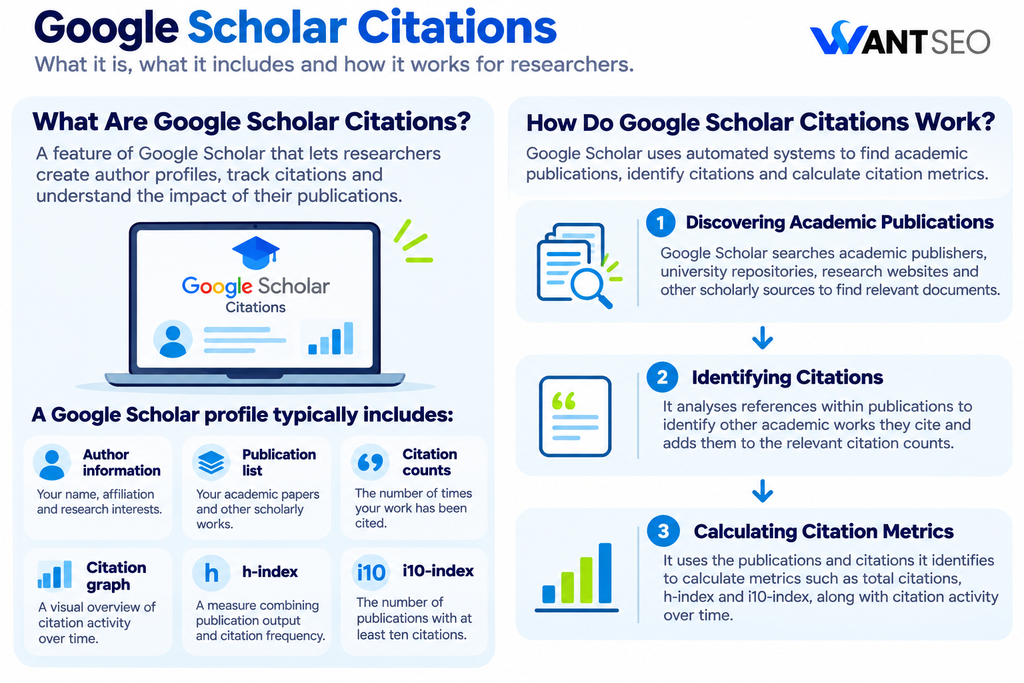
Google Scholar Citations is a feature of Google Scholar that allows researchers to create author profiles and monitor citations to their academic publications. It automatically identifies scholarly documents and references within its index, helping authors understand how frequently their work is cited by other publications. A Google Scholar profile typically includes:
- Author information: Your name, institutional affiliation and research interests.
- Publication list: Academic papers and other scholarly works associated with your profile.
- Citation counts: The number of times your publications have been cited in indexed literature.
- Citation graph: A visual overview of citation activity over time.
- h-index: A measure combining publication output and citation frequency.
- i10-index: The number of publications with at least ten citations.
Researchers can make their profiles public, allowing other academics and interested readers to explore their work. Google Scholar also updates citation metrics automatically as it identifies new publications and references. However, the accuracy of a profile still depends on maintaining correct publication records and ensuring that scholarly documents are properly indexed.
How Do Google Scholar Citations Work?
Google Scholar uses automated systems to discover academic publications, identify their bibliographic information and analyse references between documents. The process can be understood through three main stages.
1. Discovering Academic Publications
Google Scholar searches academic publishers, university repositories, research websites and other scholarly sources to identify relevant documents. These may include journal articles, conference papers, dissertations, technical reports, preprints and other academic material.
2. Identifying Citations
Once a publication is indexed, Google Scholar analyses its references to identify other academic works it cites. For example, if a research paper references your published article, Google Scholar may recognise the reference and add it to your article’s citation count.
3. Calculating Citation Metrics
Google Scholar uses the publications and references it identifies to calculate citation metrics. Researchers can view total citations, h-index and i10-index figures, alongside information about how citation activity changes over time. It is worth noting that Google Scholar’s automated systems can occasionally identify publications incorrectly or miss certain references. This is why reviewing your profile and publication records is important.
How to Create a Google Scholar Citations Profile
A Google Scholar profile gives researchers a central place to showcase their academic work and monitor citation activity. Creating one is free and relatively straightforward.
Step 1. Sign In to Your Google Account
Visit Google Scholar and select the option to create your profile. You can use an existing Google account or create a new one. Google recommends using a personal account so that you can retain access to your profile if you change institutions.
Step 2. Add Your Academic Information
Enter your name, institutional affiliation and research interests. You should also provide your university or institutional email address. Google requires a verified institutional email address, alongside a public profile, for the profile to be eligible for inclusion in Google Scholar search results.
Step 3. Add Your Publications
Google Scholar will suggest publications associated with your name. Review these carefully and select the articles you have actually written. If you have published under different name variations or worked with several research groups, you may need to search for additional records.
Step 4. Choose Your Update Preferences
You can allow Google Scholar to update your publication list automatically or review suggested additions before they appear. For researchers with common names, manual review can help prevent unrelated publications from being added.
Step 5. Make Your Profile Public
Check your publication list, institutional details and research interests before making the profile public. Once published and verified, your profile can become eligible to appear in Google Scholar results when people search for your name.
Understanding Google Scholar Citation Metrics
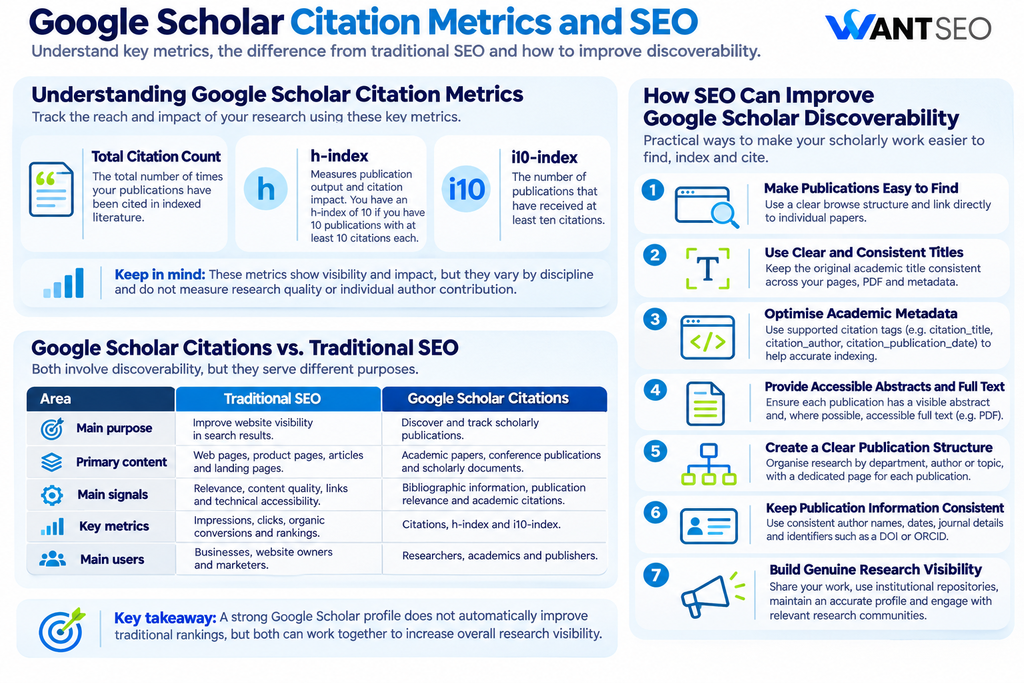
Google Scholar provides several metrics to help researchers understand the citation activity associated with their work. Each metric measures a different aspect of research output and should be interpreted in context.
1. Total Citation Count
Total citations represent the number of times publications in your profile have been cited by other documents indexed by Google Scholar. For example, if your academic publications collectively receive 300 citations, your profile will show a total citation count of 300. This provides a general indication of how frequently your research is referenced.
However, citation counts vary significantly between academic disciplines. A researcher working in a large, highly active research field may naturally receive more citations than someone working in a smaller or specialised subject.
2. h-index
The h-index measures publication output and citation impact together. A researcher has an h-index of 10 if they have at least ten publications, each with at least ten citations. For example:
| Publication | Citations |
| Paper 1 | 45 |
| Paper 2 | 32 |
| Paper 3 | 25 |
| Paper 4 | 18 |
| Paper 5 | 14 |
| Paper 6 | 9 |
| Paper 7 | 6 |
In this example, the researcher has an h-index of 5 because five publications have received at least five citations each. The metric is useful for understanding a researcher’s publication and citation record together, but it does not measure research quality or the individual contribution of each author.
3. i10-index
The i10-index measures the number of publications that have received at least ten citations. For example, if a researcher has 15 publications and eight have received ten or more citations, their i10-index is 8. It provides a simple way to understand how many publications have reached a particular citation threshold. Google Scholar displays all-time and recent versions of its citation metrics, helping researchers review both their overall record and more recent activity.
What Is the Difference Between Google Scholar Citations and Traditional SEO?
This distinction is particularly important for researchers and academic publishers who want to improve the online visibility of their work. Traditional SEO focuses on improving the visibility of web pages in search engines such as Google. It involves areas such as keyword research, technical optimisation, content quality, internal linking and website usability. Google Scholar focuses specifically on scholarly literature. Its systems identify academic publications, extract bibliographic information and analyse citations between research documents.
| Area | Traditional SEO | Google Scholar Citations |
| Main purpose | Improve website visibility in search results | Discover and track scholarly publications |
| Primary content | Web pages, product pages, articles and landing pages | Academic papers, conference publications and scholarly documents |
| Main signals | Relevance, content quality, links and technical accessibility | Bibliographic information, publication relevance and academic citations |
| Key metrics | Impressions, clicks, organic conversions and rankings | Citations, h-index and i10-index |
| Main users | Businesses, website owners and marketers | Researchers, academics and publishers |
Both involve discoverability, but they serve different purposes. A strong Google Scholar citation profile does not automatically improve a website’s traditional Google rankings. Similarly, acquiring conventional SEO backlinks does not automatically increase academic citation counts. The two approaches can support a broader digital visibility strategy, but they should not be treated as interchangeable.
How SEO Can Improve Google Scholar Discoverability
SEO principles can help academic publishers, universities and individual researchers make scholarly publications easier to discover. However, Google Scholar has specific technical and content requirements that differ from those of standard Google Search. The most useful areas to focus on include the following.
1. Make Academic Publications Easy to Find
Search engines need to discover publication URLs before they can index them. Google Scholar recommends providing a clear browse structure that allows its crawlers to find individual papers without unnecessary navigation. For researchers hosting publications on their own websites, a dedicated publications page can be useful.
Organise research by publication date, author or subject where appropriate, and link directly to individual papers. Avoid hiding important publications behind complicated navigation, inaccessible forms or unnecessary JavaScript interactions.
2. Use Clear and Consistent Publication Titles
Publication titles are an important part of bibliographic identification. Use the original academic title consistently across the publication page, PDF document and associated metadata. Avoid using multiple variations of the same title across different versions unless there is a legitimate reason. A clear title helps readers understand the subject of the research and supports accurate identification by automated indexing systems.
3. Optimise Academic Metadata
Metadata provides search engines with structured information about a publication. Google Scholar supports specific bibliographic metadata formats, including Highwire Press tags such as:
- citation_title
- citation_author
- citation_publication_date
- citation_journal_title
- citation_volume
- citation_issue
- citation_firstpage
- citation_lastpage
- citation_pdf_url
These tags help Google Scholar identify publication details and connect references with the correct documents. For example, the citation_title tag should contain the actual title of the academic paper, while citation_author should identify its authors. Incorrect or missing metadata can make it harder for automated systems to identify publications accurately.
4. Provide Accessible Abstracts and Full Text
Google Scholar requires academic websites to make either the complete article or its full author-written abstract accessible when users visit a publication URL. A page that only displays a title and basic publication details may not meet its inclusion requirements. Make sure that:
- Each publication has its own URL.
- The abstract is clearly visible.
- Full-text documents are accessible where available.
- PDF files contain searchable text rather than scanned images without OCR.
- Users and search crawlers can access the publication without unnecessary barriers.
This is important for both discoverability and the reader experience.
5. Create a Clear Publication Structure
A well-organised academic website helps researchers, readers and search engines navigate publications. For example, a university research website could organise its content into:
- Research departments.
- Individual researcher profiles.
- Publication categories.
- Journal articles.
- Conference papers.
- Research reports.
Each publication should have a separate page or document URL. Google Scholar recommends that article URLs should be discoverable through a straightforward browsing structure. Its guidance suggests that individual articles should be reachable from the homepage through no more than ten simple HTML links.
6. Keep Publication Information Consistent
Inconsistent author names, publication dates and journal information can create problems for automated indexing. For example, a researcher might publish under different name formats across several journals. This can make it harder to connect publications with the correct author profile. Maintain consistency across:
- Author names.
- Publication titles.
- Journal names.
- Publication dates.
- Volume and issue information.
- Author affiliations.
- DOI and other persistent identifiers.
Where appropriate, use an ORCID identifier to help distinguish your research record from that of other academics with similar names.
7. Build Genuine Research Visibility
Research visibility depends on more than technical indexing. Publishing useful research, sharing findings with relevant academic communities and making publications accessible can help other researchers discover and reference your work. Consider:
- Sharing publications through institutional repositories.
- Linking to research from your academic website.
- Maintaining an accurate public Google Scholar profile.
- Using relevant academic and professional networks.
- Making permitted versions of research publicly accessible.
- Keeping publication information accurate across platforms.
The objective is to make valuable research easier to discover, access and reference. Citation counts should reflect genuine academic use rather than artificial attempts to increase numbers.
How to Increase Google Scholar Citations Legitimately
Researchers often want to increase their citation counts, but the most sustainable approach is to improve the discoverability, accessibility and usefulness of their research. There is no reliable method that guarantees a particular number of citations. Instead, focus on practices that help other researchers find and use your work.
Publish Research That Addresses Relevant Questions
Research that contributes useful findings, methods or perspectives can become a valuable resource for other academics. Before publishing, consider how your work fits into existing research and what it adds to the discussion. Clear research questions, transparent methodology and well-supported conclusions make publications more useful to readers.
Make Research Accessible
Where publisher agreements and funding requirements allow, consider depositing an accepted manuscript or permitted version in an institutional or subject repository. Greater accessibility can make it easier for researchers to discover and read your work. Google Scholar also provides a Public Access section that helps authors review the availability of publications covered by relevant funding requirements.
Improve Publication Discoverability
Use accurate titles, complete abstracts and consistent bibliographic information. Make sure your publications are listed on your academic website or institutional profile and can be accessed without unnecessary navigation. These improvements help researchers and indexing systems identify the correct documents.
Collaborate With Other Researchers
Academic collaboration can expose your work to different research communities and encourage the exchange of ideas. Co-authoring relevant studies, participating in conferences and contributing to research discussions can help expand the reach of your work. However, collaborations should be based on genuine academic contributions rather than citation exchanges.
Monitor New Citations
Google Scholar allows researchers to follow their profiles and receive email notifications when new publications cite their work. Reviewing these notifications can help you understand how your research is being used and identify related developments in your field.
Common Google Scholar and SEO Mistakes to Avoid
Improving academic visibility requires accuracy and consistency. Some common mistakes can undermine the reliability of your profile or make publications harder to discover.
- Adding publications that you did not write: Google Scholar may associate publications with researchers who have similar names. Review your profile and remove unrelated records.
- Ignoring duplicate publications: The same paper may appear in multiple versions. Merge duplicate records where appropriate to avoid confusing publication records and citation metrics.
- Using incomplete bibliographic information: Missing author names, publication dates or journal details can make it difficult for indexing systems to identify a document correctly.
- Hiding abstracts behind access barriers: Google Scholar needs to access the complete author-written abstract or full text. Avoid unnecessary login requirements, pop-ups and other barriers on publication pages.
- Treating citations as conventional backlinks: Academic citations and SEO backlinks serve different purposes. A citation in a research paper is not automatically equivalent to a backlink in a traditional SEO campaign.
- Trying to manipulate citation counts: Artificial citation exchanges, irrelevant self-citations and other attempts to inflate metrics can undermine academic credibility. Focus on producing useful research and making it accessible.
How to Monitor and Improve Your Google Scholar Profile
Maintaining your profile is an ongoing task. Reviewing it periodically helps ensure that your publications and citation metrics remain as accurate as possible. Start by checking your publication list for missing articles, duplicate records and incorrect author associations. You should also review your citation graph to understand how your research is being referenced over time. Look at the publications receiving citations, rather than focusing exclusively on the total number displayed.
If your work is not appearing correctly, investigate the publication source. Missing citations may result from inaccessible documents, incorrect bibliographic information or problems with how references are formatted. Google Scholar allows researchers to correct their own profile records, but they cannot directly edit the citation counts calculated by its indexing system. In some cases, the publisher or website hosting the citing paper may need to resolve the underlying indexing issue.
Conclusion
Google Scholar Citations is a useful resource for researchers who want to monitor academic publications, understand citation activity and maintain a public research profile. For SEO professionals and academic publishers, it also highlights the importance of making scholarly content accessible, technically organised and easy to identify. However, Google Scholar visibility and traditional SEO performance should be treated as separate areas. Academic citations are not the same as SEO backlinks, and a higher h-index does not automatically translate into better Google rankings.
The most effective approach is to focus on accurate publication information, accessible research, clear website structures and genuine academic contributions. Ultimately, better discoverability starts with making valuable research easier for the right people to find, understand and use.
FAQs
1. What are Google Scholar Citations?
Google Scholar Citations is a feature that allows researchers to create public profiles, track academic citations and monitor metrics such as total citations, h-index and i10-index.
2. Does Google Scholar help with SEO?
Google Scholar can improve the discoverability of academic publications within scholarly search. However, it is separate from traditional Google Search rankings and does not guarantee improved website SEO performance.
3. How can I make my research appear in Google Scholar?
Publish your research on an accessible academic website or repository, provide accurate bibliographic information and follow Google’s scholarly content and indexing guidelines.
4. What is the difference between Google Scholar citations and backlinks?
Google Scholar citations are references to academic publications within scholarly documents. SEO backlinks are links from other websites to a webpage. They serve different purposes and should not be treated as equivalent.
5. How can I increase my Google Scholar citation count?
Focus on producing useful research, improving publication accessibility, maintaining accurate metadata and sharing your work through relevant academic communities. No legitimate method can guarantee a specific citation count.
6. Does Google Scholar automatically update citation metrics?
Yes. Google Scholar updates citation metrics as its systems discover new publications and references. Researchers should still review their profiles for missing, duplicate or incorrectly attributed articles.