

12 Proven WordPress SEO Tips That Actually Work
WordPress gives businesses a strong foundation for SEO, but merely installing it does not automatically make a website search-friendly or its WordPress SEO perfect. The platform provides useful features such as configurable permalinks, headings and sitemaps, while plugins can make certain optimisation tasks easier. But the platform itself is only the starting point. Your site’s structure, content, technical setup and user experience still determine how effectively search engines can discover, understand and serve your pages.
For eCommerce businesses especially, the challenge is not finding another SEO plugin or adding more keywords. It is making sure the WordPress site supports the pages, products and topics that matter commercially. Google’s current guidance reinforces this approach. Its generative AI search experiences continue to rely on core Search systems, which means foundational SEO practices remain relevant. Crawlability, useful content, clear technical structures and a good page experience still matter.
Here are 12 WordPress SEO tips worth prioritising.
Key takeaways
- Get the technical foundation right first. Make sure important pages can be crawled, indexed and accessed without unnecessary technical barriers instead of finding shortcuts or hacks for WordPress SEO.
- Use WordPress’s flexibility to create a clear site structure. Logical categories, internal links and concise URLs help both users and search engines understand your website.
- Optimise content around user intent, not keyword repetition. A page should satisfy the reason someone searched rather than simply contain a target phrase.
- Do not mistake plugins and SEO settings for an SEO strategy. Tools can support execution, but they cannot decide which pages deserve investment or whether your content is genuinely useful.
What is WordPress SEO?
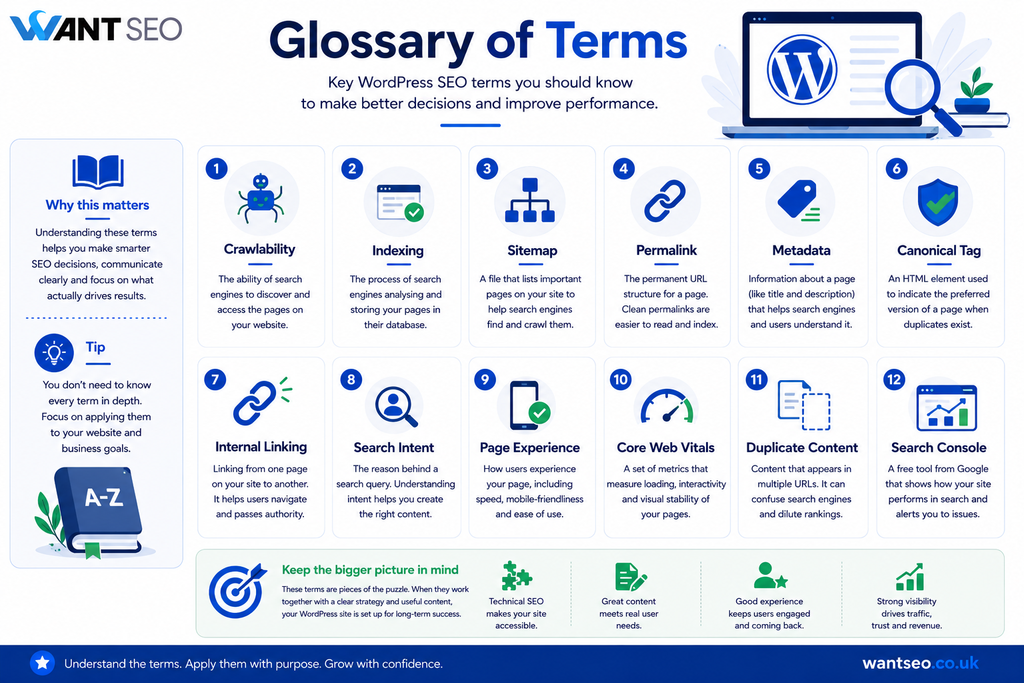
WordPress SEO is the process of improving a WordPress website so search engines can crawl, understand and index its content effectively, while making the site useful for the people who visit it. It covers several areas, including technical SEO, content, site architecture, internal linking, metadata, page experience and search intent. Neil Patel’s current WordPress SEO guidance similarly focuses on practical foundations such as visibility to search engines, SSL, consistent URL structures, permalinks, SEO plugins, keyword research, URLs, metadata and headings.
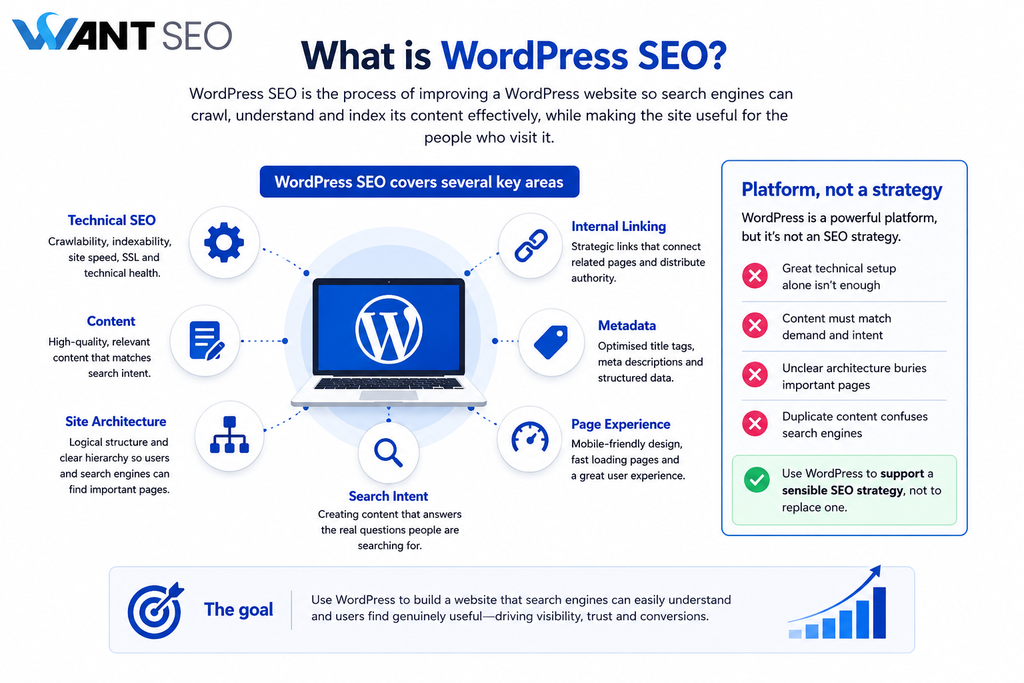
The important distinction is that WordPress is a platform, not an SEO strategy. You can have a technically sound WordPress website and still struggle because the content does not match demand, the architecture is unclear, important pages are buried, or the site creates unnecessary duplication. The objective should therefore be to use WordPress to support a sensible SEO strategy rather than trying to make the platform itself responsible for SEO performance.
12 WordPress SEO tips that actually work
A strong WordPress SEO strategy is not about implementing every possible optimisation at once. It is about identifying the changes most likely to improve how search engines understand your site and how users experience it.
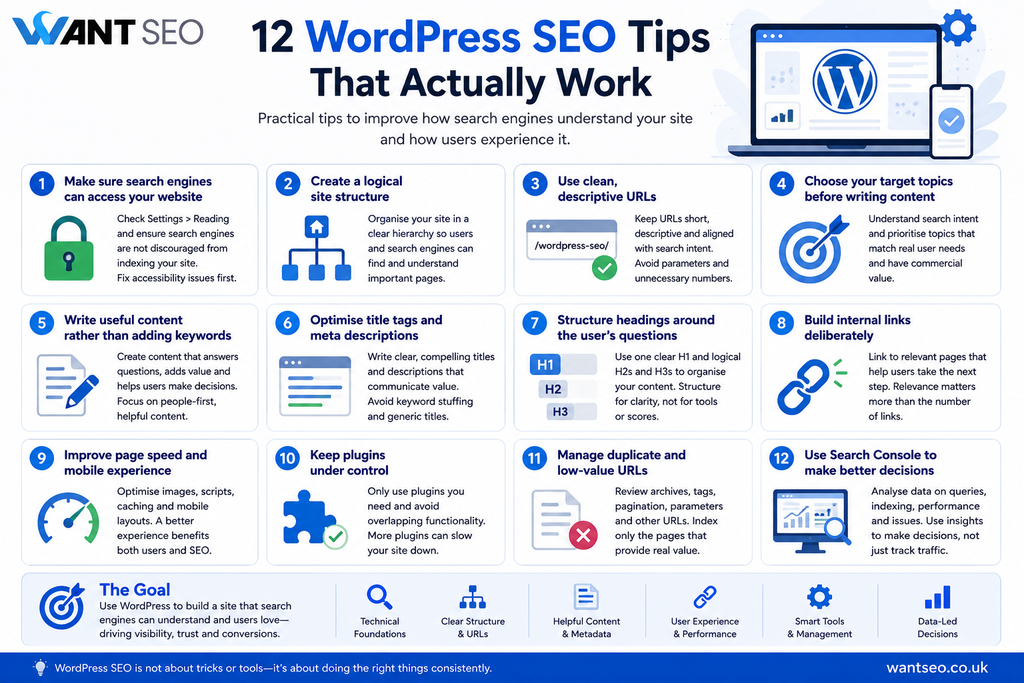
The following 12 tips focus on the practical areas worth prioritising, from technical foundations and site structure to content, internal linking and performance.
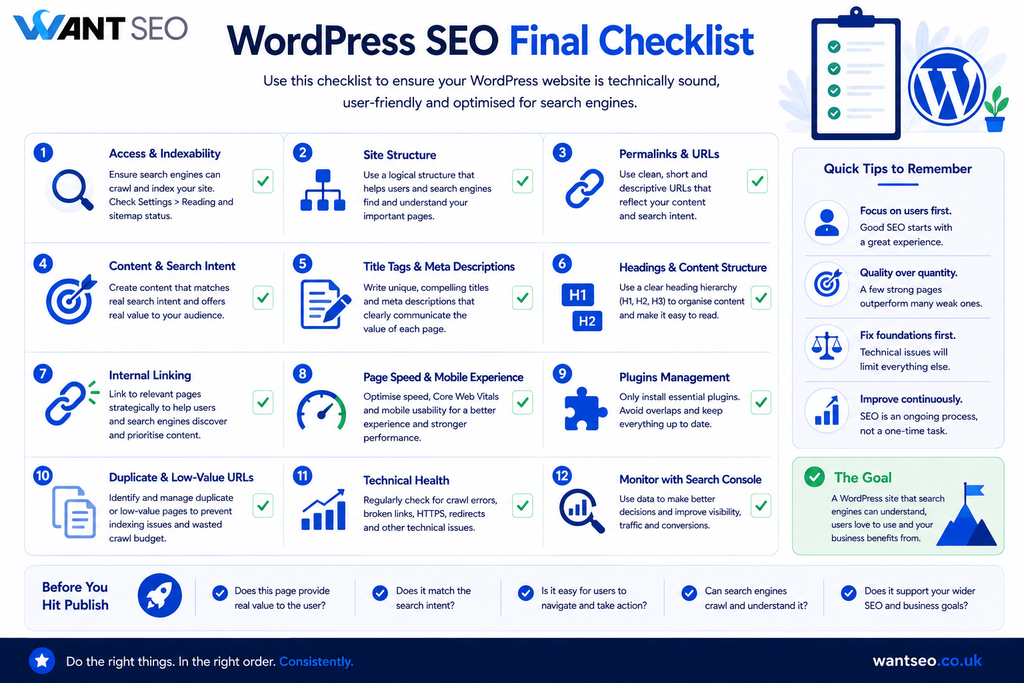
1. Make sure search engines can access your website
Before optimising individual pages, check that your website is actually available for indexing. WordPress includes a setting that can discourage search engines from indexing the site. If this has been enabled accidentally, your wider SEO work can become irrelevant.
In WordPress, check Settings > Reading and make sure the option to discourage search engines from indexing the site is not enabled.
This is a simple check, but it illustrates an important principle: fix fundamental accessibility issues before spending time on detailed optimisation. Google states that pages need to meet its technical requirements and be eligible for indexing to appear in its Search features, including generative AI experiences. Applying this fix can be your first step to improving WordPress SEO for your website.
2. Create a logical site structure
A good WordPress website should make sense before you start thinking about individual keywords. Your structure should reflect how users expect to find information. For an eCommerce website, that might look something like:
Home → Category → Subcategory → Product
For a content-led website, it could be:
Home → Topic → Subtopic → Article
The exact structure depends on the business, but the principle remains the same: important pages should be easy to discover and logically connected. A clear structure also makes internal linking easier and helps search engines understand the relationship between different pages. Neil Patel’s WordPress SEO guidance highlights logical site organisation as a foundation for helping users navigate and search engines crawl and index content.
3. Use clean, descriptive URLs
WordPress allows you to control permalink structures, which is useful because URLs are part of how users and search engines understand a page. Avoid unnecessarily complicated URLs containing meaningless parameters or long strings of numbers where a descriptive structure would work better.
For instance:
example.com/?p=123
is less useful to a person than:
example.com/wordpress-seo/
A good URL should be concise, descriptive and consistent with the page’s purpose. Do not force keywords into URLs simply because you think it will improve rankings. The objective is clarity. It is recommended to keep WordPress URLs short, descriptive and aligned with search intent.
4. Choose your target topics before writing content
One of the easiest ways to create ineffective WordPress content is to start publishing before deciding what the website should be known for. Keyword research is useful, but the output should not simply be a spreadsheet of phrases. You need to understand the underlying intent.
Someone searching for “best running shoes for beginners” has a different need from someone searching for “Nike Pegasus 41 men’s size 10”
The first may be researching options. The second is much closer to a product decision. Your content strategy should reflect those differences. Search Engine Land’s wider SEO guidance emphasises understanding search intent and targeting the right keywords as part of an effective SEO foundation. For Want SEO, this is where prioritisation matters. Do not ask only, “What keywords can we target?”
Ask:
“Which search needs are commercially important enough to deserve a page?”
5. Write useful content rather than adding keywords
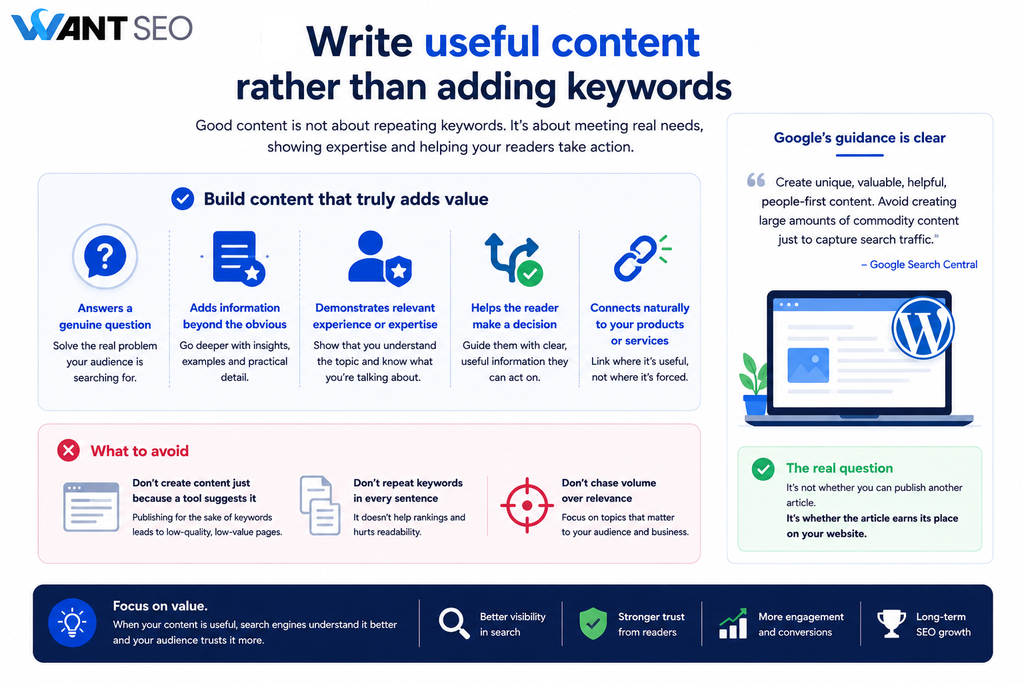
Keyword optimisation still has a role, but repeating a phrase throughout a page is not a substitute for usefulness. Google’s current guidance for generative AI search places particular emphasis on unique, valuable, helpful and people-first content. It specifically warns against creating large amounts of commodity content simply to capture different search variations. That means a WordPress blog should not exist simply because your SEO plugin tells you that another keyword needs a page. A stronger approach is to build content that:
- Answers a genuine question
- Adds information beyond what is already obvious
- Demonstrates relevant experience or expertise
- Helps the reader make a decision
- Connects naturally to your products or services where relevant
The question is not whether you can publish another article. It is whether the article earns its place on the website.
6. Optimise title tags and meta descriptions
Title tags remain an important part of helping search engines and users understand a page. Your title should clearly communicate what the page is about while naturally incorporating the primary topic where appropriate. Meta descriptions are not a simple ranking lever, but they can help communicate the value and relevance of a page in search results. Avoid turning either element into a string of keywords.
For example, instead of:
WordPress SEO | WordPress SEO Tips | WordPress SEO Guide | SEO WordPress
use something clearer:
12 WordPress SEO Tips That Actually Work
The second communicates the page’s purpose immediately. WordPress SEO plugins can make managing titles and descriptions easier, but the strategic decision about what each page should target still needs to come from the underlying content strategy. Neil Patel’s WordPress guidance highlights plugins such as Yoast SEO and Rank Math for managing metadata and related SEO tasks.
7. Structure headings around the user’s questions
Headings help readers navigate a page and provide structure for search engines. Use one clear H1 that describes the main topic, then use H2s and H3s to organise supporting sections. For example:
H1: WordPress SEO
H2: What is WordPress SEO?
H2: How to improve WordPress SEO
H3: Improve your site structure
H3: Optimise your URLs
The hierarchy should reflect the logic of the page. Do not add headings simply because an SEO tool recommends a certain number of them. Google’s guidance says content should be organised in a way that helps readers, including through clear paragraphs and headings.
8. Build internal links deliberately
Internal linking is one of the most useful areas of WordPress SEO because WordPress makes it relatively easy to connect related pages. But internal links should have a purpose. If you publish an article about technical SEO, it might naturally link to a relevant technical SEO service page. An article about ecommerce category pages might link to a guide on ecommerce SEO.
This helps users move from information towards the next relevant decision. It also helps search engines discover pages and understand how content relates across the site. The key is relevance. Do not add dozens of internal links because a tool recommends a specific number. Link when the destination genuinely helps the reader.
9. Improve page speed and mobile experience
A technically accessible page is not automatically a good experience. WordPress sites can become slow when themes, plugins, scripts, images and third-party services accumulate without enough consideration for their impact. Look at the complete experience rather than chasing a single speed score. Review:
- Image sizes
- Unnecessary plugins
- Heavy themes
- Third-party scripts
- Caching
- Server performance
- Mobile layouts
- Core Web Vitals
Google’s guidance includes page experience among the technical considerations worth maintaining, including ensuring that pages work well across devices and reducing latency. The commercial point is straightforward: if a page makes it harder for someone to browse, compare or buy, the problem is bigger than SEO.
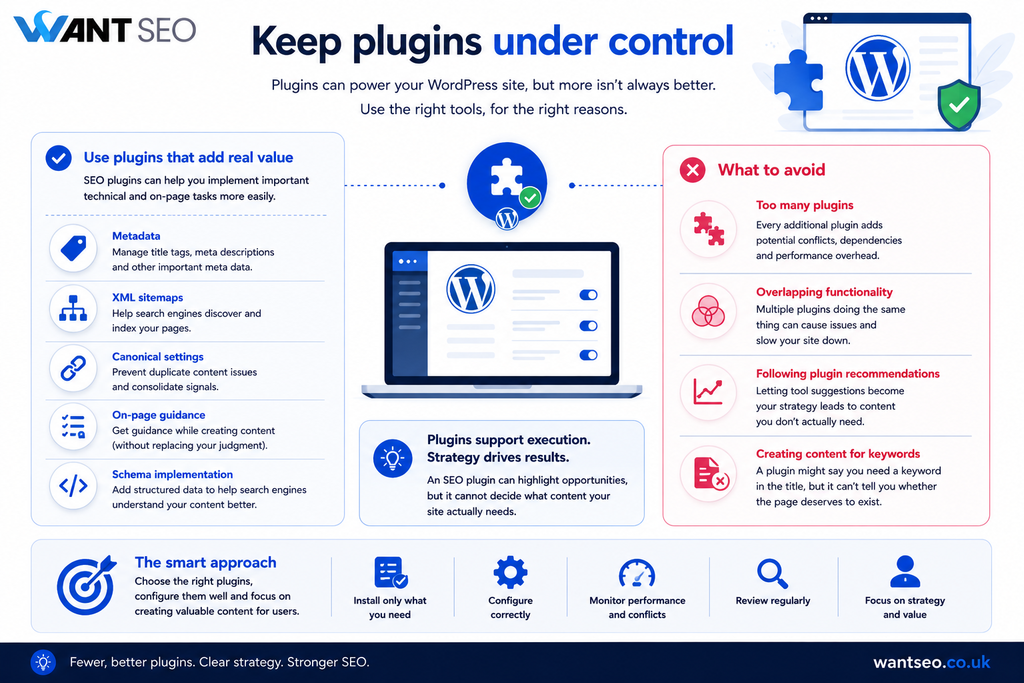
10. Keep plugins under control
WordPress plugins can make SEO implementation easier, but more plugins do not mean better SEO. Every additional plugin introduces another potential dependency, configuration requirement or performance consideration. Choose tools based on what the website actually needs. For SEO, a plugin can help with tasks such as:
- Metadata
- XML sitemaps
- Canonical settings
- Basic on-page guidance
- Schema implementation
But avoid installing multiple plugins that perform overlapping functions. More importantly, do not let plugin recommendations become the strategy. An SEO plugin can tell you that a page has a target keyword in its title. It cannot tell you whether the page deserves to exist.
11. Manage duplicate and low-value URLs
WordPress can create multiple ways of accessing similar content. Depending on the site’s setup, this can include:
- Category archives
- Tag pages
- Author archives
- Pagination
- Search result pages
- Attachment URLs
- Parameter variations
Not every one of these needs to be indexed. The correct approach depends on the site’s architecture and the value of each URL. Google’s current guidance specifically recommends reducing unnecessary duplicate content because it can create a poor user experience and cause search engines to spend resources crawling URLs that are not useful.
This is another reason why WordPress SEO should be approached as a system. Do not simply ask whether a page can be indexed. Ask whether having that page indexed contributes anything useful.
12. Use Search Console to make better decisions
SEO should not finish when a page is published. Google Search Console provides useful evidence about how Google is discovering and processing your website. Use it to investigate areas such as:
- Search queries
- Indexed pages
- Search performance
- Sitemap status
- Indexing issues
- Technical problems
- Changes in organic visibility
Google’s latest guidance also points website owners towards its Generative AI performance report for understanding how content is performing in generative AI features on Google Search. The important point is not to obsess over dashboards. Use the data to identify decisions. For example:
A page gets impressions but very few clicks. Is the page actually aligned with the search intent?
A commercially important page is not indexed. Is there a technical or architectural reason?
A category receives search demand but converts poorly. Is the issue SEO, the landing experience, or the offer?
That is much more useful than simply reporting that organic traffic went up or down.
What WordPress SEO plugins can and cannot do
SEO plugins are useful, but they are often given too much credit. They can make technical and on-page tasks easier. They can help manage metadata, generate sitemaps and provide guidance while editing content. They cannot determine:
- Which markets you should target
- Which topics have commercial value
- Whether your content is genuinely differentiated
- Whether a category structure makes sense
- Whether your product pages convert
- Whether you are investing in the right SEO opportunities
In other words, plugins support execution. They do not replace strategy. This distinction matters because it prevents teams from spending time optimising pages that should never have been created or prioritised in the first place.
What should you prioritise first?
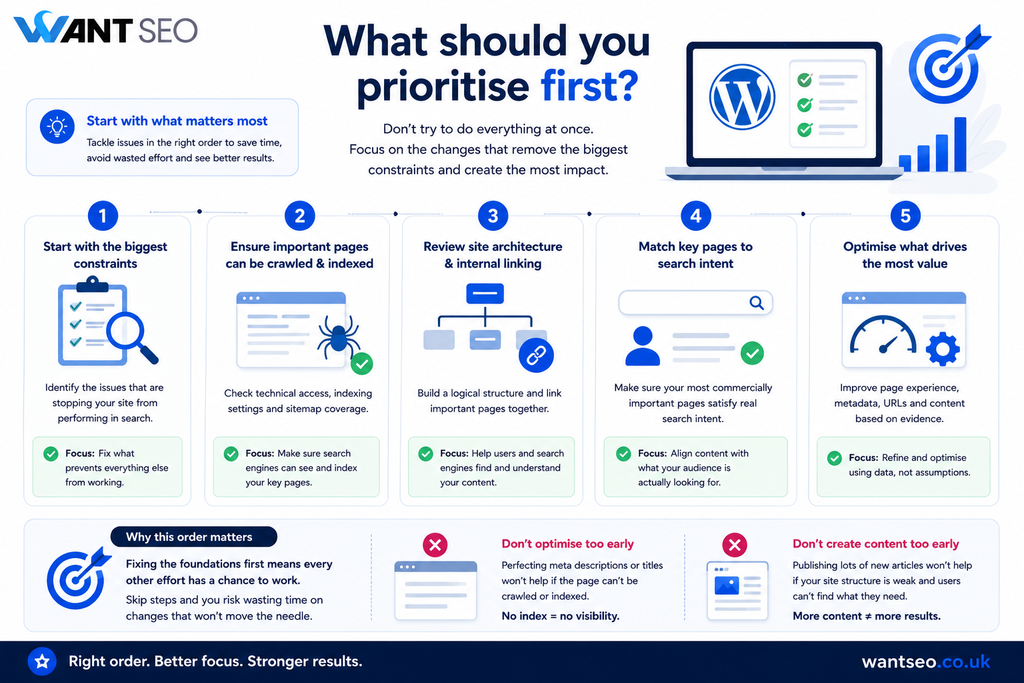
If your WordPress website has SEO problems, do not try to implement all 12 recommendations simultaneously.
- Start with the issues most likely to constrain everything else.
- First, make sure important pages can be crawled and indexed.
- Then review your site architecture and internal linking.
- Next, identify whether your most commercially important pages match genuine search intent.
- After that, improve page experience, metadata, URLs and supporting content where the evidence suggests they matter.
This order reduces wasted effort. There is little value in perfecting the meta description of a product page if Google cannot index the page. There is also limited value in publishing 50 new articles if your existing category structure is confusing users and search engines.
Common WordPress SEO mistakes to avoid
The biggest WordPress SEO mistakes are often not complicated. They are usually decisions made without enough prioritisation.
- Installing too many SEO plugins: More tools can create more complexity without creating better outcomes.
- Publishing content for every keyword variation: Google’s current guidance explicitly warns against creating content primarily to manipulate search visibility.
- Chasing plugin scores: A green SEO score does not mean that a page satisfies the user’s intent or supports the commercial strategy.
- Ignoring site architecture: Good individual pages cannot compensate indefinitely for a confusing website structure.
- Treating traffic as the final outcome: More organic visitors are only useful when they contribute to something commercially meaningful.
- Focusing only on technical SEO: Technical health matters, but it is one part of the system. Strong WordPress SEO also requires useful content, sensible architecture and alignment with what users actually need.
Does WordPress automatically handle SEO?
WordPress provides several SEO-friendly foundations, but it does not automatically optimise an entire website. Neil Patel’s current guidance notes that WordPress includes features such as permalinks, sitemaps, headings and HTML markup that support SEO. However, those foundations still need to be configured and used properly. A WordPress site can be technically sound and still have weak SEO because its content strategy, information architecture or commercial priorities are unclear. That is why the platform should be viewed as an enabler rather than the strategy itself.
Conclusion
Effective WordPress SEO is not about finding the right combination of plugins and ticking every optimisation box. It is about creating a website that search engines can access, users can understand, and the business can commercially benefit from. The strongest approach is usually straightforward:
Fix the foundations. Clarify the structure. Match content to intent. Improve the experience. Measure what matters.
Google’s current direction reinforces that these fundamentals remain relevant even as Search incorporates generative AI experiences. Useful, people-first content and a clear technical structure remain more important than chasing separate AI or SEO “hacks”. For an eCommerce business, the final question should therefore be bigger than “Is my WordPress site SEO-friendly?”
Ask: “Is our website helping the right people find, understand and choose what we sell?”
That is where WordPress SEO starts becoming commercially useful rather than simply technically complete.
FAQs
1. Is WordPress good for SEO?
Yes. WordPress provides several useful SEO foundations, including configurable URLs, headings and sitemap functionality. But strong SEO still depends on how the site is structured, what content it publishes and how well it serves user intent.
2. Do I need an SEO plugin for WordPress?
An SEO plugin can make certain tasks easier, such as managing metadata and sitemaps, but it is not essential to having an SEO strategy. The right plugin should support your workflow rather than determine your strategy.
3. How can I improve WordPress SEO quickly?
Start with the fundamentals. Check that important pages are indexable, review your site structure, improve internal linking, make URLs clear and ensure your most important pages satisfy the relevant search intent.
4. Does WordPress SEO help with AI search?
Yes, because Google’s current guidance says its generative AI search experiences rely on core Search systems and that foundational SEO remains relevant. Crawlability, useful content and clear technical structures continue to matter.
5. How often should I review WordPress SEO?
There is no useful universal schedule. Review performance and technical health regularly, and carry out additional checks after major site changes, migrations, redesigns, plugin changes or significant drops in organic performance.
6. Should I optimise every WordPress page for SEO?
No. Not every page needs to be an organic search landing page. Prioritise pages where search visibility supports a genuine user need and a meaningful business objective. Some low-value or utility URLs may not need to be indexed at all.



