
Want SEO
How to Submit Your Website to Google and Search Engines?
Launching a website is only the first step towards building an online presence. Once your website is live, you also need search engines such as Google and Bing to discover its pages, understand their content and consider them for inclusion in search results. Although search engines can find websites automatically, submitting your website directly can help make the discovery process more straightforward.
If you have recently launched a website, published new pages or updated important content, you may be wondering how to submit your website to Google and other search engines. Fortunately, the process does not require expensive tools or specialist software. You can use free webmaster platforms, submit XML sitemaps and request indexing for individual pages.
However, submitting a website does not guarantee that every page will be indexed or appear in search results. Search engines still need to evaluate the accessibility, relevance, quality and usefulness of your content before deciding whether to include it.
In this guide, we explain how to submit your website to Google, Bing and other search engines, how to check whether your pages have been indexed and what to do if your website is not appearing in search results.
Can You Submit Your Website to Search Engines?
Yes, you can submit your website to search engines using their webmaster tools and sitemap submission features. These tools allow you to tell search engines about your website, provide a list of important URLs and request that individual pages be crawled.
Search engines can also discover websites automatically by following links from other websites, checking previously discovered URLs and processing XML sitemaps. This means submitting your website is not always necessary, but it can be useful, particularly for new websites with few external links.
For example, if you launch a new eCommerce website with 200 product pages, search engines may not immediately discover every product URL. Submitting a sitemap provides a structured list of those pages, helping search engines identify URLs they may need to crawl.
The important distinction is that website submission helps search engines discover content, while indexing and ranking remain decisions made by the search engine.
How to Submit Your Website to Google
Google is often the first search engine website owners want to submit their websites to. The most practical way to do this is through Google Search Console, Google’s free platform for monitoring website performance and search visibility.
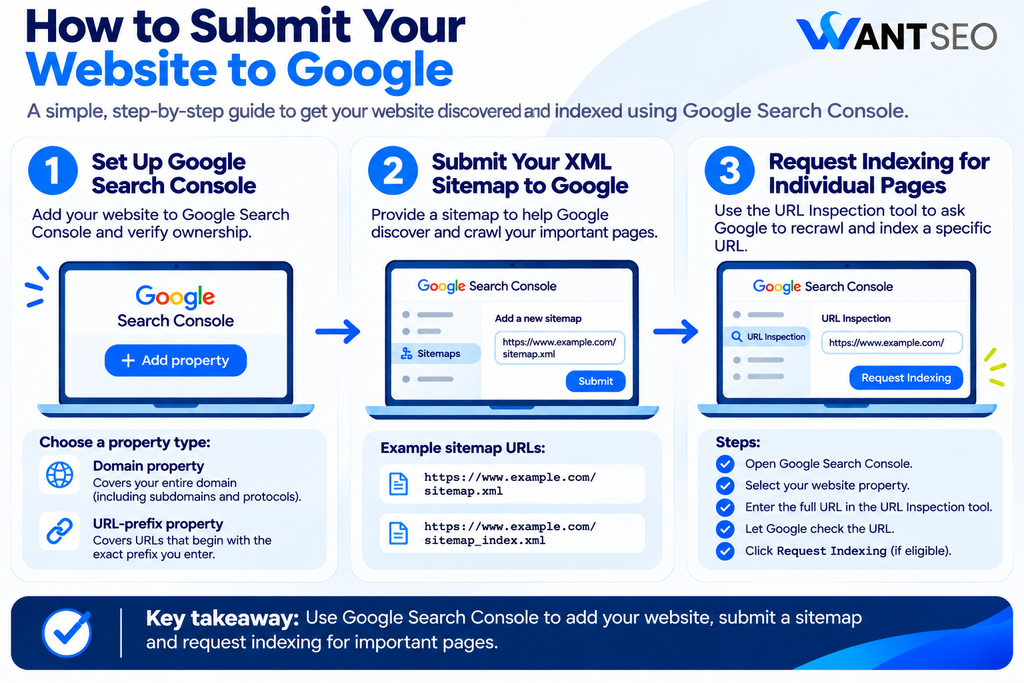
1. Set Up Google Search Console
Start by opening Google Search Console and signing in with your Google account. You will need to add your website as a property before you can access its reports or submit a sitemap. Google offers two property types:
- Domain property: Covers your entire domain, including subdomains and different protocols.
- URL-prefix property: Covers URLs that begin with the exact prefix you enter.
For most website owners, a Domain property provides a broader view of their website because it includes variations such as HTTP, HTTPS and subdomains. Once you have added your website, Google will ask you to verify ownership. This is usually completed by adding a DNS record through your domain provider, although other verification methods may be available for URL-prefix properties.
2. Submit Your XML Sitemap to Google
An XML sitemap contains a list of URLs you want search engines to discover and crawl. It is particularly useful for websites with large numbers of pages, new websites with limited external links or websites that regularly publish new content. Once your website is verified in Google Search Console:
- Open your Google Search Console property.
- Select Sitemaps from the navigation menu.
- Locate the Add a new sitemap field.
- Enter your sitemap URL.
- Click Submit.
Your sitemap might be located at one of the following addresses:
https://www.example.com/sitemap.xml
Or
https://www.example.com/sitemap_index.xml
The exact location depends on your website platform and SEO plugin. Submitting a sitemap helps Google discover URLs, but it does not guarantee that every URL will be crawled or indexed. Make sure the sitemap contains canonical URLs that you actually want to appear in search results, rather than redirects, duplicate pages or unnecessary URLs.
3. Request Indexing for Individual Pages
If you have published a new article, updated an important product page or made substantial changes to a URL, you can use Google Search Console’s URL Inspection tool to request indexing. To do this:
- Open Google Search Console.
- Select your website property.
- Enter the full URL into the URL Inspection search bar.
- Allow Google to check the URL.
- If the page is eligible, click Request Indexing.
This is particularly useful for individual pages that you want Google to revisit. For example, if you have published a new buying guide targeting a valuable search topic, you can request indexing rather than waiting for Google to discover the update naturally. However, requesting indexing repeatedly does not guarantee faster results. If the page has accessibility, quality or technical issues, resolve those first.
How to Submit Your Website to Bing
Bing is another important search engine to consider when submitting your website. Its search results also contribute to the visibility of websites across other search experiences and services that use Bing’s search data. You can use Bing Webmaster Tools to verify your website, submit sitemaps, monitor indexing and investigate search performance.
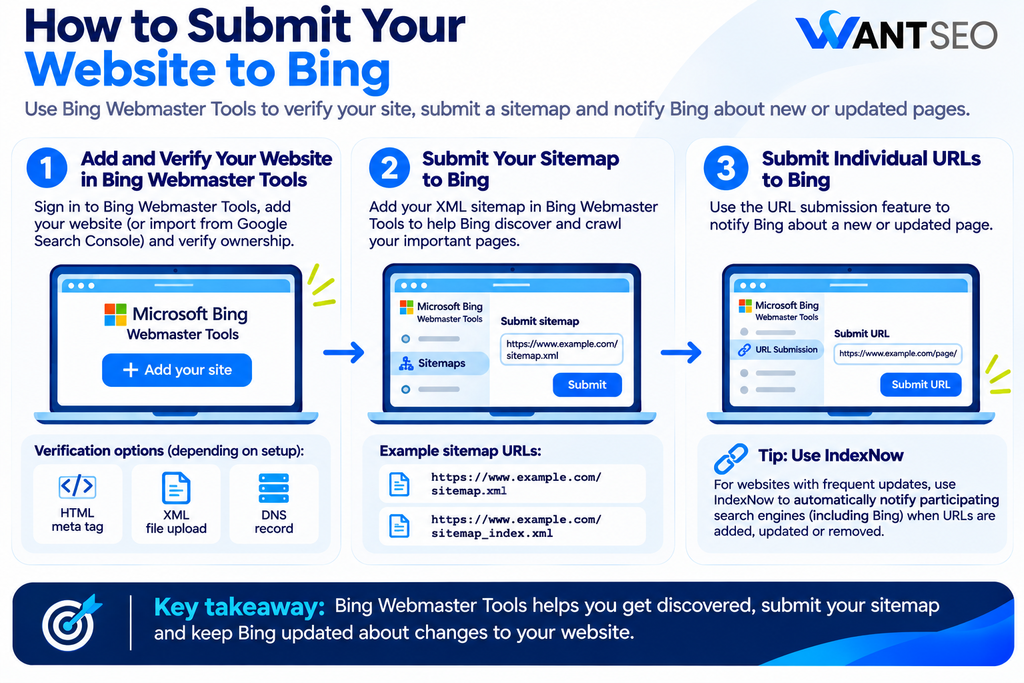
1. Add and Verify Your Website in Bing Webmaster Tools
Visit Bing Webmaster Tools and sign in using your Microsoft account or another supported sign-in method. You can add your website manually or, where available, import an existing website setup from Google Search Console. Importing can simplify the process if you have already verified your website with Google.
If you add your website manually, Bing will ask you to verify ownership. Depending on the verification option, you may need to add an XML file, an HTML meta tag or a DNS record to your website. Once verification is complete, you can access the available reports and submission tools.
2. Submit Your Sitemap to Bing
After verifying your website, submit your XML sitemap through Bing Webmaster Tools. The process generally involves:
- Open your verified website property.
- Navigate to the Sitemaps section.
- Select the sitemap submission option.
- Enter your full sitemap URL.
- Submit the sitemap for processing.
Bing will then attempt to process the sitemap and discover the URLs included in it. You can review the submission status and investigate any reported issues. If your sitemap contains invalid URLs, inaccessible pages or other problems, resolve them before resubmitting.
3. Submit Individual URLs to Bing
Bing Webmaster Tools also allows you to submit individual URLs through its URL submission feature. This can be useful when you have published a new page or made a significant update to an existing one and want to notify Bing directly.
For websites with frequent content updates, however, manually submitting URLs is not always the most efficient approach. Automated solutions such as IndexNow may provide a more practical way to notify participating search engines when URLs are published, updated or removed.
How to Submit Your Website to Other Search Engines
Google and Bing should generally be the starting points for most websites. However, depending on your target audience, location and business model, you may also want to consider other search engines.

1. Submit Your Website to Yahoo
Yahoo Search has historically relied on Bing’s search technology for its web search results. For many websites, submitting and maintaining your website through Bing Webmaster Tools is therefore a practical starting point for improving discoverability across Bing-powered search experiences. Rather than treating Yahoo as an entirely separate submission process, prioritise making sure your website is properly configured and discoverable through Bing.
2. Submit Your Website to DuckDuckGo
DuckDuckGo uses a combination of sources to generate its search results, including its own crawler and third-party search sources. There is no traditional standalone website submission process that works in the same way as Google Search Console. Ensuring your website is crawlable, maintaining a useful sitemap and improving discoverability through other search engines can help support your visibility. For this reason, focus on strong technical foundations rather than looking for a submission form that guarantees your website will appear in DuckDuckGo.
3. Submit Your Website to Yandex
If your business targets audiences in Russia or relevant regions where Yandex is widely used, you may want to consider Yandex Webmaster. The platform allows website owners to add and verify websites, submit sitemaps and monitor how Yandex interacts with their content. For businesses targeting UK audiences, Yandex may not be a priority. Search engine submission should reflect where your potential customers actually search rather than creating unnecessary work across every available platform.
4. Use IndexNow for Participating Search Engines
IndexNow is a protocol that allows website owners to notify participating search engines when URLs are added, updated or deleted. Instead of relying entirely on search engines to discover changes through their normal crawling processes, IndexNow provides a direct notification that relevant content has changed. You can implement IndexNow through supported CMS platforms, plugins, hosting providers or a custom integration.
It can be particularly useful for:
- eCommerce websites with frequently updated product pages.
- Websites publishing content regularly.
- Websites removing or replacing URLs.
- Large websites where changes occur across many pages.
- Businesses that want to automate URL notifications.
IndexNow is not supported by every search engine. Google does not participate in IndexNow, so you should continue using Google Search Console and sitemap submission for Google.
Why XML Sitemaps Matter When Submitting Your Website
An XML sitemap is one of the most useful resources for helping search engines discover your website’s content. Rather than relying only on internal links or external websites to find URLs, search engines can use your sitemap as a structured list of pages you want them to consider crawling. A sitemap is particularly useful for:
- Newly launched websites.
- Websites with large product catalogues.
- Websites publishing content frequently.
- Pages that are not easily reached through internal links.
- Websites with complex structures or multiple sections.
However, your sitemap should not simply contain every URL your website generates. Include pages that are valuable and eligible to appear in search results. Avoid including URLs that redirect, return errors, contain duplicate content or are intentionally excluded from indexing.
For example, an eCommerce website may have thousands of URLs generated by filters, sorting options and product variations. Submitting all of these URLs can create unnecessary crawling complexity. A carefully maintained sitemap should support your website’s intended structure, not expose every possible URL.
How to Check If Your Website Has Been Indexed by Google
After submitting your website, you may want to confirm whether Google has started indexing its pages. One quick method is to use Google’s site: search operator. Enter the following into Google:
site:yourwebsite.com
Replace yourwebsite.com with your actual domain.
Google may display pages from your website that appear in its search results. You can also check individual URLs:
site:yourwebsite.com/blog/example-article/
This can provide a quick indication of whether a particular page appears in Google’s results. However, site: searches are not a complete or guaranteed list of indexed pages. If you need more reliable information about the indexing status of specific URLs, use Google Search Console.
Use Google Search Console for a More Accurate Check
Google Search Console provides reports about the indexing status of your website’s URLs. You can use the Page Indexing report to review pages that Google has indexed, pages that have been excluded and the reasons Google has reported for those exclusions. If you are investigating a specific page, use URL Inspection to check its reported indexing status and whether Google can access it. This is a more useful approach than relying entirely on site: searches, particularly when investigating technical SEO issues.
What to Check Before Submitting Your Website to Search Engines
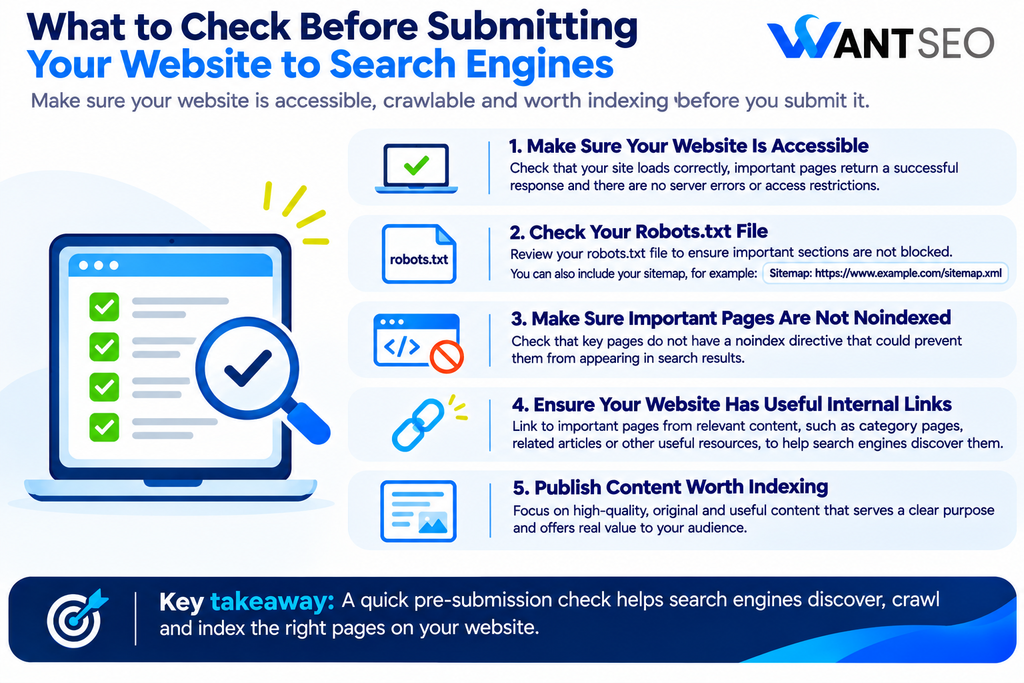
Submitting your website is only useful if search engines can access the pages you want them to discover. Before submitting your sitemap or requesting indexing, review the following areas.
1. Make Sure Your Website Is Accessible
Your website should load correctly without requiring search engines to complete unnecessary steps. Check that important pages return a successful HTTP response and that the website is not affected by server errors, broken links or access restrictions. If Googlebot or Bingbot cannot access your pages, submitting their URLs will not resolve the underlying issue.
2. Check Your Robots.txt File
Your robots.txt file provides crawling instructions to search engine crawlers. Review it to ensure important sections of your website are not unintentionally blocked. For example, a rule that blocks an entire website during development may accidentally remain in place after launch. Your robots.txt file may also include a sitemap reference, such as:
Sitemap: https://www.example.com/sitemap.xml
This provides search engines with another way to discover your sitemap.
3. Make Sure Important Pages Are Not Noindexed
A page may be accessible to visitors but still be excluded from search engine indexing if it contains a noindex directive. Review important pages to ensure they are not unintentionally marked as noindex. This is particularly important after website migrations, redesigns or development changes where settings from a staging website may have been carried over.
4. Ensure Your Website Has Useful Internal Links
Search engines use links to discover pages and understand relationships between content. Important pages should be accessible through relevant internal links rather than existing as isolated URLs.
For example, a new blog article should ideally be linked from an appropriate category page, related article or other relevant resource. Internal links help search engines discover content and provide visitors with a clearer way to navigate your website.
5. Publish Content Worth Indexing
Technical accessibility is only one part of the process. Search engines do not have to index every page they discover. If your website contains thin, duplicate, incomplete or unhelpful pages, submitting them through a sitemap will not automatically make them valuable search results.
Before submitting your website, make sure important pages provide a clear purpose, useful information and a reason for someone to visit.
Why Your Website May Not Appear in Google After Submission
Submitting your website does not guarantee that it will immediately appear in search results. There are several reasons why your website or individual pages may remain unindexed.
Google Has Not Crawled Your Website Yet
New websites may take time to be discovered and crawled, particularly if they have few external links and limited visibility elsewhere. Submitting a sitemap and requesting indexing for important pages can help Google discover your website, but crawling timelines vary.
Your Pages Are Blocked From Crawling
If your robots.txt file prevents Googlebot from accessing important pages, Google may not be able to crawl their content properly. Review your crawling rules and ensure that important URLs are accessible.
Your Pages Contain a Noindex Directive
A noindex directive tells search engines not to include a page in their search results. If this has been added accidentally, remove it from pages that you want indexed.
Your Website Has Duplicate or Low-Value Content
Search engines may decide that certain pages do not provide enough distinct value to include in their indexes. This can happen with duplicate pages, automatically generated URLs, thin content or pages that offer little information beyond what is already available elsewhere.
Your Website Has Limited Discoverability
Search engines may find it harder to discover a website that has no sitemap, few internal links and little external visibility. Building a logical website structure and earning relevant links can support discovery over time. The important thing is to investigate the reason a page is not appearing rather than repeatedly submitting the same URL without making any improvements.
Common Website Submission Mistakes to Avoid
Submitting your website is relatively simple, but a few mistakes can create unnecessary problems.
- Submitting every URL without checking its quality: Your sitemap should focus on pages that you genuinely want search engines to index. Including duplicate, redirected or low-value URLs can create unnecessary noise.
- Expecting immediate indexing: Search engines have their own crawling and indexing processes. Submission does not guarantee immediate inclusion.
- Repeatedly requesting indexing: Submitting the same URL repeatedly does not force Google to crawl it faster. Focus on accessibility, content quality and technical eligibility.
- Ignoring technical issues: A sitemap cannot resolve blocked crawling, server errors, incorrect canonical tags or accidental noindex directives.
- Treating indexing as the final SEO goal: A page appearing in Google is only one stage of organic search performance. It still needs to target relevant intent, provide useful information and support a meaningful business outcome.
How Want SEO Can Help Your Website Get Discovered
Getting your website submitted to search engines is a straightforward process. The more important question is whether your website is technically accessible, structured properly and worth indexing. At Want SEO, we help eCommerce businesses understand what is preventing their website from performing effectively and where optimisation effort should be prioritised. Our approach goes beyond submitting URLs or checking indexing reports. We assess how technical SEO, content structure, search intent and conversion experience work together.
Depending on your website’s needs, we can help with:
- Technical SEO: Identify crawling, indexing and accessibility issues that may prevent important pages from being discovered.
- Website structure: Improve internal linking and navigation so search engines and users can reach valuable content more easily.
- Content optimisation: Review existing pages and identify where information needs to be improved, expanded or clarified.
- eCommerce SEO: Prioritise product and category pages based on search demand, relevance and commercial value.
- SEO strategy: Build a clear plan for what to address first, what can wait and where effort is likely to have the greatest impact.
Submitting your website is a useful starting point, but it should sit within a wider SEO strategy that supports discoverability, relevance and business growth.
If your website is new, struggling to get indexed or not attracting the right organic visibility, explore our SEO services or eCommerce SEO services to understand where your next steps should be.
Conclusion
Submitting your website to Google and other search engines helps them discover your pages and understand which URLs you want them to consider crawling. For Google, Google Search Console and XML sitemap submission are the main starting points. For Bing, Bing Webmaster Tools and IndexNow can support website discovery and URL notifications. Other search engines may have their own webmaster tools or rely on shared discovery systems.
However, submission alone does not guarantee indexing or rankings. Make sure your website is accessible, your sitemap contains the right URLs, your important pages are internally linked, and your content provides genuine value. Once your website has been submitted, monitor indexing status and investigate any issues affecting important pages.
The objective is not simply to get every URL into a search engine. It is to make sure the right pages can be discovered, understood and considered useful for the people searching for them.
FAQs
1. How do I submit my website to Google for free?
Set up Google Search Console, verify your website, submit your XML sitemap and use URL Inspection to request indexing for individual pages where appropriate.
2. How long does it take Google to index a submitted website?
There is no fixed timeframe. Google may crawl and index pages within days, but it can take longer depending on the website’s accessibility, content, discoverability and other factors.
3. Do I need to submit my website to every search engine?
No. Start with Google and Bing, then consider additional search engines based on your target audience, location and business needs.
4. Does submitting a sitemap guarantee that my pages will be indexed?
No. A sitemap helps search engines discover URLs, but they decide which pages to crawl, index and display in search results.
5. How do I submit a new blog post to Google?
Use Google Search Console’s URL Inspection tool, enter the full URL of your article and select Request Indexing if the page is eligible.
6. Can I submit my website to Google without Search Console?
Google can discover your website automatically through links and sitemaps, but Search Console is the recommended platform for submitting sitemaps, requesting indexing and monitoring website performance.