
Want SEO
What Is Google Voice Search? How to Optimise It for Your Website’s SEO?
People do not always type their searches into Google. They might ask their phone where to find a product, use a voice assistant to check business opening hours or ask a question while driving. Instead of entering short keywords, they use natural language to explain what they need. This is where Google Voice Search comes in. It allows users to search the web by speaking into a device rather than typing a query. For businesses, this creates another reason to understand how people search, what questions they ask and how clearly a website answers them.
However, optimising for voice search does not mean creating a separate SEO strategy or filling pages with conversational keywords. It means making your existing content useful, accessible and easy to understand for people who search in different ways.
What Is Google Voice Search?
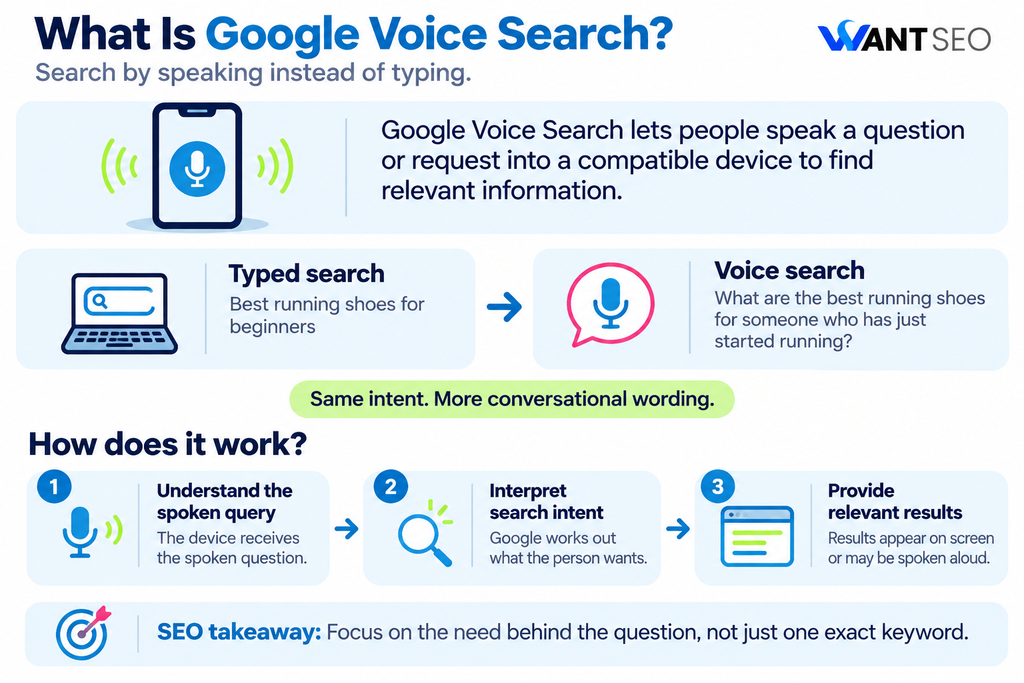
Google Voice Search is a feature that allows users to perform searches using spoken commands instead of typing words into the search bar. Users can speak a question or request into a smartphone, tablet or compatible device, and Google processes the spoken input to provide relevant search results.
For example, someone looking for running shoes might type: “Best running shoes for beginners”
With voice search, the same person might ask: “What are the best running shoes for someone who has just started running?”
The intention is similar, but the spoken query is more conversational and detailed.
Google’s voice search technology has also evolved. In October 2025, Google Research explained how its Speech-to-Retrieval technology can retrieve information directly from spoken queries without first converting every query into text. This demonstrates how voice search continues to develop beyond simple speech-to-text processing.
For website owners, the important point is that people can express the same search intent in different ways. Your content should address the underlying need rather than depend on one exact keyword phrase.
How Does Google Voice Search Work?
Google Voice Search combines speech recognition and search technology to understand what a person is asking and identify relevant information. The process generally involves three stages.
1. Understanding the spoken query: When someone speaks into a device, the voice input is processed to identify the words, context and meaning of the request.
2. Interpreting search intent: Google attempts to understand what the person wants to find. This involves considering the wording of the query and its context. For example, asking “Where can I buy running shoes near me?” indicates a local purchasing requirement rather than a general interest in running.
3. Providing relevant results: Google then returns relevant search results or information through the available search experience. Depending on the query and device, users may see results on screen or hear a spoken response.
The result selection process is not simply about finding a page containing the same words as the spoken question. Relevance, content quality and the usefulness of the information all matter.
What Is the Difference Between Voice Search and Traditional Search?
The main difference is how users communicate their search requirements. Traditional searches are often shorter because people tend to remove unnecessary words when typing. Voice searches can be more conversational because users speak in the same way they would ask another person a question.
| Traditional Search | Voice Search |
| Running shoes for beginners | What are the best running shoes for beginners? |
| Coffee shops near me | Where can I find a coffee shop near me? |
| How to clean leather shoes | How do I clean my leather shoes at home? |
| Best skincare products | Which skincare products are best for dry skin? |
| Ecommerce SEO services | Who provides SEO services for ecommerce websites? |
This difference matters when planning content. A page optimised only around short keyword variations may not address all the questions customers ask before making a decision. Understanding conversational search behaviour can help identify missing information and improve how well a page meets user intent. However, there is no need to create separate pages for every spoken variation of an existing keyword. One useful, comprehensive page can address several closely related queries.
How to Optimise Your Website for Google Voice Search
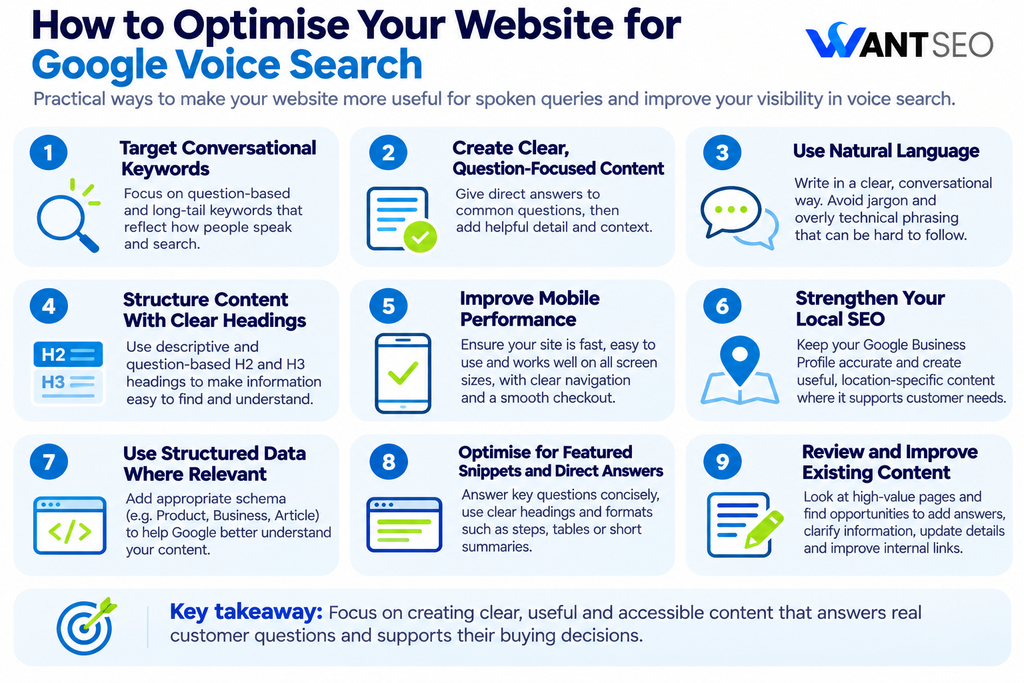
Voice search optimisation should build on your existing SEO foundations. The following areas are practical starting points for making your website more useful for spoken queries.
1. Target Conversational and Long-Tail Keywords
People often use complete questions when speaking to a search engine. This makes conversational and long-tail keywords useful when researching voice search opportunities. For example, instead of targeting only “best coffee machine”, you could explore related queries such as:
- Which coffee machine is best for home use?
- What should I look for when buying a coffee machine?
- How much should I spend on a coffee machine?
- Which coffee machine is easiest to clean?
These queries reveal more about what users want to understand before purchasing. Use keyword research tools, Google Search Console and Google’s search suggestions to identify relevant questions. You can also review customer support conversations, product reviews and on-site search data to understand the language customers naturally use.
The objective is not to insert every question into your content. Prioritise the queries that represent genuine customer needs and have a clear connection to your products or services.
2. Create Content That Answers Questions Clearly
A voice search user often wants a direct answer rather than a lengthy explanation before reaching the information they need. Structure your content so that important questions are easy to identify and answer.
For example, an article about choosing running shoes could include a heading such as: What should beginners look for in running shoes?
Follow it with a direct explanation before expanding on cushioning, fit, support and different running surfaces. This approach helps readers understand the main point quickly while still giving them access to more detailed information. Search Engine Land’s voice search guidance also highlights the value of clear answers, useful content formats and natural language when preparing content for spoken queries.
3. Use Natural and Conversational Language
Your website should sound natural when someone reads its content aloud. Overly technical sentences, unnecessary jargon and awkward keyword placement can make information difficult to understand. This is particularly important for informational pages, product guides and FAQs.
For example, instead of writing: “Premium footwear solutions designed to facilitate enhanced comfort during extended physical activity.”
You could write: “Our running shoes are designed to provide comfort and support during longer runs.”
The second version communicates the benefit more clearly. Conversational writing does not mean making every page informal or removing useful detail. It means explaining information in a way that matches how your audience thinks and communicates.
4. Structure Content With Clear Headings
Well-organised content helps visitors find the information they need without reading every paragraph. Use descriptive H2 and H3 headings to organise related topics and questions. Where appropriate, use question-based headings that reflect the way customers search. For example, an eCommerce guide about choosing a mattress might include:
- What type of mattress is best for side sleepers?
- How firm should a mattress be?
- How long does a mattress usually last?
- What size mattress should I buy?
Answer each question directly, then provide supporting information. Avoid creating headings simply to include more keywords. Each section should address a distinct question or help the reader make a better decision.
5. Improve Mobile Website Performance
Mobile devices are an important part of voice search because people frequently use their smartphones to ask questions while moving between activities. A website that is difficult to use on a mobile device can create problems even if its content is relevant. Review your website for:
- Responsive layouts that adapt to different screen sizes.
- Readable text without unnecessary zooming.
- Buttons and navigation elements that are easy to use.
- Images that are appropriately compressed.
- Fast-loading pages and stable layouts.
- A straightforward checkout experience.
Google uses the mobile version of website content for indexing and ranking through mobile-first indexing. It also recommends ensuring that mobile pages contain the same important content as their desktop equivalents.
For eCommerce businesses, this is particularly important. Customers who discover a product through a spoken query should be able to review its details, compare options and complete a purchase without unnecessary friction.
6. Strengthen Your Local SEO
Voice search can be particularly useful for people looking for nearby businesses, services and products. Someone might ask:
- Where is the nearest shoe shop?
- Which restaurants are open near me?
- Where can I buy a phone charger nearby?
If your business serves customers in a specific location, your local SEO foundations should be accurate and consistent. Start by maintaining an up-to-date Google Business Profile. Check that your business name, address, phone number, opening hours and website details are correct. You should also create useful location-specific website content where it genuinely supports customer needs. Include relevant service areas, local information and details about what customers can expect.
Do not add location keywords to pages where they have no meaningful relevance. Local optimisation should reflect where your business actually operates.
7. Use Structured Data Where Relevant
Structured data helps search engines understand information on your website by providing additional context about its content. For example, an eCommerce website may use relevant structured data to describe:
- Products and product variants.
- Product prices and availability.
- Business information.
- Breadcrumb navigation.
- Articles and other content types.
This can help Google understand your pages and make them eligible for supported search features. However, an important distinction is necessary: there is no special schema markup that guarantees your website will appear in Google Voice Search results.
Use structured data that accurately describes visible page content and follows Google’s guidelines. Do not add irrelevant markup simply because you want to appear in spoken answers. Google’s documentation explains which structured data types it supports and how they can influence search appearance.
8. Optimise for Featured Snippets and Direct Answers
Featured snippets are selected search results that aim to provide a concise answer to a user’s question. They can be useful for understanding how Google presents direct answers, although appearing in a featured snippet does not guarantee selection for a voice response. To make your content easier to understand:
- Answer relevant questions directly.
- Use descriptive headings.
- Present instructions in a logical order.
- Use numbered steps when explaining a process.
- Include tables when comparing products or specifications.
- Support important claims with reliable information.
For example, if your article explains how to clean leather shoes, provide a short explanation of the basic process before discussing materials, precautions and more detailed instructions. This makes the content easier to navigate and gives search engines clear information about the topic.
9. Review Your Existing Content Before Creating More
Voice search optimisation does not always require publishing new articles. Your website may already contain useful information that could be made clearer or more complete. Start by reviewing pages that attract relevant organic search traffic or support important commercial journeys. Look for opportunities to:
- Add answers to common customer questions.
- Improve unclear product descriptions.
- Explain technical specifications in simpler language.
- Include relevant comparisons and buying guidance.
- Update outdated information.
- Improve headings and internal links.
For an eCommerce business, product and category pages deserve particular attention. Customers may ask specific questions about product size, compatibility, materials, delivery and returns before deciding to buy. If these details are missing, publishing another informational article may not solve the underlying problem. Improving the existing product experience could have greater commercial value.
How to Measure the Performance of Voice Search SEO
Measuring voice search performance is not straightforward because Google Search Console does not provide a dedicated report showing which searches came specifically from voice input. This means you should avoid treating voice search as a separate traffic channel that can always be measured directly. Instead, review indicators that help you understand whether your website is becoming more useful for conversational searches.
- Monitor question-based search queries: Use Google Search Console to identify queries that contain question-based wording, such as “how”, “what”, “where” and “which”. Review the impressions, clicks and landing pages associated with these searches.
- Review relevant landing page performance: Check whether pages targeting informational and conversational queries are attracting relevant visitors. Consider whether those visitors move towards useful actions, such as viewing products, comparing options or making purchases.
- Assess mobile performance: Review mobile usability and Core Web Vitals to identify issues that could make your website difficult to use on smartphones.
- Monitor local search visibility: If your business serves a local market, review Google Business Profile performance and the effectiveness of your location-specific landing pages.
The aim is to understand whether your SEO improvements are helping customers discover useful information and move towards meaningful actions. Do not rely on assumptions about how many visitors arrived through voice search when that data is not available.
Common Voice Search SEO Mistakes to Avoid
Voice search optimisation can become unnecessarily complicated when businesses focus on tactics rather than the actual needs of their customers. Here are some common mistakes to avoid.
- Creating separate pages for every spoken query: Several conversational searches may have the same underlying intent. Creating a separate page for each variation can lead to repetitive content. Cover related questions within a useful, well-structured page instead.
- Stuffing content with question-based keywords: Adding questions throughout a page does not automatically make it suitable for voice search. Every question should have a clear purpose and provide useful information.
- Assuming FAQ schema guarantees voice visibility: Structured data can help Google understand supported content types, but it does not guarantee that a page will be selected as a spoken answer. Use markup accurately and follow Google’s current documentation.
- Ignoring the wider SEO foundations: A conversational article cannot compensate for major technical problems, poor internal linking or unhelpful content. Make sure your website remains accessible, crawlable and useful across different search experiences.
- Prioritising voice search over commercial intent: Not every voice query represents a buying opportunity. Some users are researching, while others are ready to purchase. Understand the intent behind each query before deciding where to invest your optimisation effort.
How Want SEO Can Help Optimise Your Website for Voice Search
Optimising for voice search starts with understanding how your customers search, what questions they ask and what information they need before making a purchase. At Want SEO, we look beyond individual keywords to identify how your website can better meet these needs. Our approach brings SEO, content strategy and conversion optimisation together. Depending on your website and commercial priorities, we can help with:
- Conversational keyword research: Identify natural-language searches, long-tail keywords and customer questions relevant to your products or services.
- Content optimisation: Improve existing pages with clear answers, useful information and headings that reflect customer search intent.
- Product and category page improvements: Make product details, specifications and buying information easier for customers and search engines to understand.
- Technical SEO: Review mobile performance, page accessibility, structured data and other technical factors that support your website’s search visibility.
- Local SEO: Improve relevant business information and location-based content to support customers searching for nearby products or services.
- Conversion optimisation: Identify opportunities to make the journey from discovering your website to completing a purchase clearer and easier.
We also consider how users move from discovering your website to making a purchase. After all, visibility is only part of the process. Your website needs to provide clear information, build confidence and make it easy for visitors to take the next step. Rather than creating unnecessary content or chasing every new search trend, we focus on improvements that make your website more useful to customers and support your wider business objectives.
Want to understand how your website can perform better across changing search behaviours? Speak to Want SEO about your SEO priorities, and we’ll help identify where to focus your efforts.
Conclusion
Google Voice Search has changed how people interact with search engines, allowing them to ask questions in a more natural and conversational way. For businesses, the practical response is not to create a separate SEO strategy built around voice commands. It is to make existing content clearer, answer relevant questions, improve mobile usability and ensure that important website information is easy to understand. For eCommerce brands, this also means reviewing product information, category pages and customer questions to identify where better content could support purchasing decisions.
Voice search should be considered part of a wider SEO approach. Focus on the information your customers need, the intent behind their searches and the improvements that can make a genuine difference to your website’s performance.
FAQs
1. What is Google Voice Search used for?
Google Voice Search allows users to search the web by speaking questions or commands into compatible devices instead of typing them.
2. Does voice search affect SEO rankings?
Voice search does not have a separate ranking system that requires a completely different SEO strategy. Strong content, technical accessibility and relevant answers remain important.
3. How do I optimise my website for voice search?
Focus on conversational keywords, clear answers, useful headings, mobile usability, relevant structured data and local SEO where appropriate.
4. Is voice search better than traditional search?
Neither is universally better. Voice search is convenient for hands-free questions, while traditional search can be more useful when users want to compare multiple results visually.
5. Does FAQ schema help with voice search?
FAQ content can help address common questions, but FAQ schema does not guarantee voice search visibility. Use structured data only when it accurately represents your page and follows Google’s guidelines.
6. Can eCommerce websites benefit from voice search optimisation?
Yes. Clear product descriptions, useful buying guides, accurate product information and answers to common customer questions can help eCommerce websites serve conversational search intent.